

Vielen Dank, hat soweit geklappt.

ERWEITERTE MEMBERLISTE
Neuer Shop von Pur Digital, ich hoffe es funktioniert alles so wie es soll.
Habe extra kein Update gemacht, da ich so viel besser alten Schrott losgeworden bin.
-
-
DE Info für diejenigen unter Ihnen, die es in Woltlab-6.0 installieren möchten
EN Info for those of you who want to install it in woltlab-6.0DE Ohne Bearbeitung wird in der Vorlage kein COVER PHOTO angezeigt
EN without editing Template does not show COVER PHOTO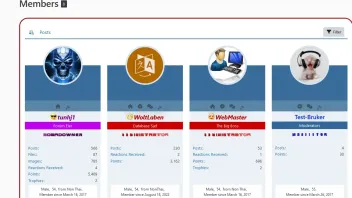 Artikel
CoverPhoto LoSti's World Erweiterte Memberliste
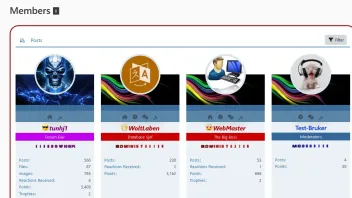
Eine kleine Anleitung wie ihr die CoverPhotos in die "Erweiterte Memberliste von LoSti's World" bekommt Mipu20. April 2020 um 13:53 Im Template userListItem sucht ihr nach
Smarty: Fehler{if MODULE_USER_COVER_PHOTO}<div class="userListItemBackground" style="background-image: url({@$user->getCoverPhoto()->getURL()});"></div>{/if}Code: richtig<div class="userListItemBackground" style="background-image: url({@$user->getCoverPhoto()->getURL()});"></div>Im Template usersOnlineList sucht ihr nach
Smarty: Fehler{if MODULE_USER_COVER_PHOTO}<div class="userListItemBackground" style="background-image: url({@$user->getCoverPhoto()->getURL()});"></div>{/if}Code: richtig<div class="userListItemBackground" style="background-image: url({@$user->getCoverPhoto()->getURL()});"></div>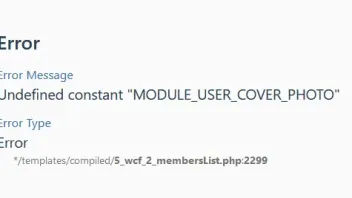
-
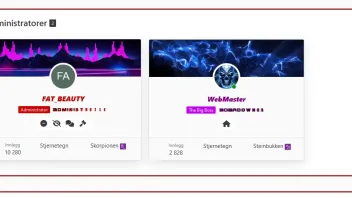
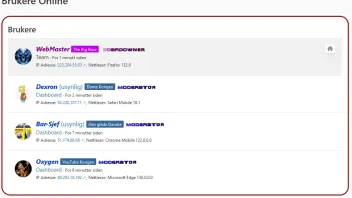
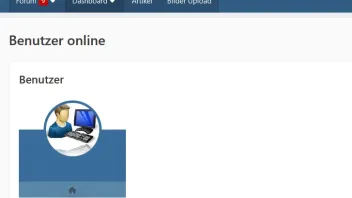
DE haben Sie eine Idee, wie Sie Mitglieder online bringen können, um sie so anzuzeigen, wie sie in Mitgliedern und Teams in 6.1 sind?
EN do you have an idea how to get members online to show as it is in members and Teams in 6-1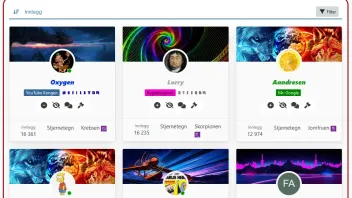
-
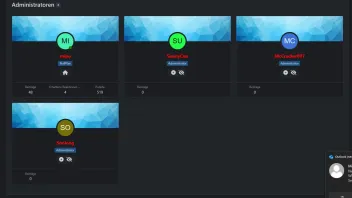
DE Meinst du für die Suite 6.0, wenn ja ist das nicht so einfach, du musst da 3 Templates ändern eins komplett.
EN Do you mean for Suite 6.0? If so its not that easy you have to change three templates one completely.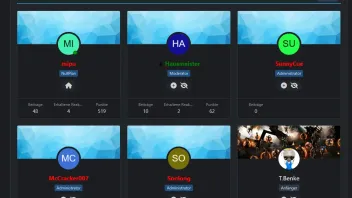
-
DE Nein, es ist für 6-1 auf 6-0, ich habe alles OK
EN No it's for 6-1 on 6-0 I have everything OK -
-
DE in 6-1 ist es ursprünglich so, aber nicht unter Benutzer online
EN in 6-1 it is like this originally but not under user onlinehttps://www.woltlab.com/article/314-ne…e-members-list/
DE Aber nicht unter den Mitgliedern online
EN But not under members onlineDE in 6-0 folge ich diesem und alles ist OK
EN in 6-0 I follow this and everything is OKBeitragRE: ERWEITERTE MEMBERLISTE
wcf.bbcode.quote.text misterpu
ERWEITERTE MEMBERLISTE
wcf.bbcode.quote.text
CoverPhoto LoSti's World Erweiterte Memberliste
Im Template userListItem sucht ihr nach
(Quelltext, 1 Zeile)
(Quelltext, 1 Zeile)
Im Template usersOnlineList sucht ihr nach
(Quelltext, 1 Zeile)
(Quelltext, 1 Zeile)
 tunhj1
4. November 2023 um 20:47 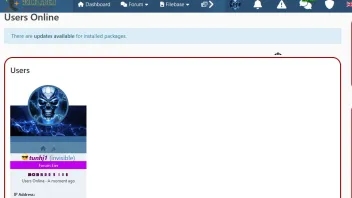
DE können Sie mir erklären, wo ich die Datei memberlistAll.scss finde?
EN can you explain where I find the memberlistAll.scss file -
Die findest du im Ordner style/ui
-
-
Wenn ich genau wüsste, was du möchtest könnte ich dir auch richtig helfen.
-
You are good and can you help me
Go to your FTP and search for the folder style/ui
-
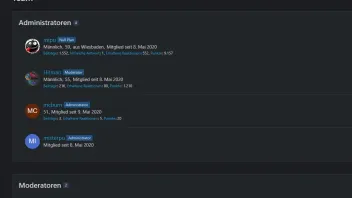
DE wie Sie auf dem Bild sehen können, das ich gepostet habe, sowie auf dem Link hier, konnten Sie Mitglieder online zeigen, wie ich will
EN as you can see in the picture I posted as well as the link here you have been able to show members Online as I want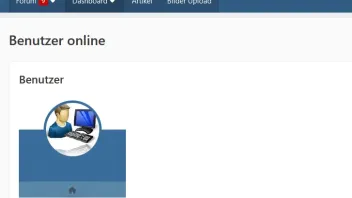
https://wsc61.wbbsupport.de/index.php?users-online-list/
DE Können Sie mir helfen, Online-Mitglieder auf die gleiche Weise anzuzeigen?
EN Can you help me show Members Online in the same way -
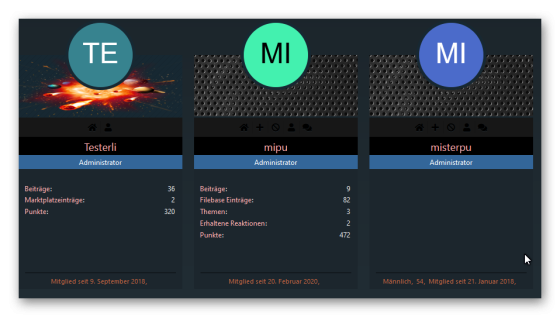
DE Setze das in dein Stilunabhängiges CSS und SCSS, ist aber die Ansicht wie hier in der 5.5, wie in 6.1, geht so nicht, da muss das komplette Template umgebaut werden.
EN Put that in your style-independent CSS and SCSS‚ but the view is like this in 5.5 like in 6.1‚ it doesn't work like that‚ the entire template has to be rebuilt.CSS
Alles anzeigenbody[id="tpl_wcf_usersOnlineList"] { @include screen-md-up { .containerList { .details.userInformation { > dl.inlineDataList { > dt { font-weight: bold; width: 100% !important; } > dd { width: 100% !important; text-align: left !important; margin-bottom: 10px !important; } > dd:not(:last-of-type):after { display: none; } } } } } } body[id="tpl_wcf_usersOnlineList"] { @include screen-md-up { .containerList.userList { display: flex; flex-wrap: wrap; width: calc(100% + 20px); margin-left: -10px; > li { display: flex; justify-content: center; padding: 10px; border-bottom: none; margin-top: 70px; min-width: 220px; background: transparent; box-shadow: none; border: none; } > li:hover { background: transparent; box-shadow: none; border: none; } .containerHeadline { margin-top: 80px; p { background: var(--wcfSidebarBackground) ; text-align: center; font-size: 12px; } > h3 { display: flex; flex-direction: column; text-align: center; padding: 0; > .badge { min-width: 100%; max-width: 100%; padding: 4px 6px; border-radius: 0; } span.icon.icon16.fa-lock.jsUserBanned { margin-top: -24px; margin-bottom: 8px; } > a.username.userLink, a.username { background: var(--wcfSidebarBackground) ; padding: 5px; } } } .box48 { position: relative; flex-direction: column; width: 100%; background: var(--wcfSidebarBackground) ; padding: 0; min-height: 400px; &::before { content: ""; position: absolute; width: 100%; height: 140px; background: url(data:image/png;base64,iVBORw0KGgoAAAANSUhEUgAAAAoAAAAKCAYAAACNMs+9AAAAPElEQVQoU2NkIA5IMRKhToqBgeEZIYVgRSDD8CmEK8KnEEURLoUYirApxKoIXSFORcgK8SqCKSSoCKQQAJD/CSUFonnJAAAAAElFTkSuQmCC) repeat, var(--wcfHeaderBackground); border-bottom: 33px solid rgba(var(--wcfStatusSuccessBackground-rgb) / 0.2); } > :last-child { width: 100%; } > a { z-index: 1; margin-bottom: 0; } .userListItemBackground { position: absolute; background-size:cover; display:block; height:90px; width:100%; } .userAvatarImage { border: 5px solid var(--wcfHeaderBackground); background: var(--wcfHeaderBackground); height: 120px; width: auto; margin-top: -60px; } > :first-child:not(:last-child) { margin-right: 0; z-index: 1; } } .details.userInformation { .inlineList { margin-top: -2px; justify-content: center; > li { text-align: center; color: var(--wcfSidebarText); font-size: 11px; &:last-child { width: 100%; } } } > ul.inlineList.commaSeparated { position: absolute; bottom: 1px; right: 11px; left: 11px; padding: 5px 10px; border-top: 1px solid var(--wcfSidebarBackground); } > dl.plain.inlineDataList.small { margin: 0 0 28px 0; padding: 20px 10px; } > dl.inlineDataList { > dt { width: 70%; } > dd { width: 28%; text-align: right; } > dd:not(:last-of-type):after { display: none; } } } } .containerList > li .buttonGroupNavigation { display: flex; width: 100%; justify-content: center; opacity: 1; right: 0; top: 110px; background: transparent; padding: 3px 5px; > ul { background: transparent; border: none; border-radius: 0; > li { padding: 0; > a { margin-top: -180px; margin-bottom: -10px; &:hover > .icon { color: var(--wcfSidebarDimmedText); text-shadow: none; } > .icon { color: var(--wcfHeaderMenuBackground); text-shadow: 0 1px 0 var(--wcfHeaderBackground); } } } } } ul > li:not(:last-child) { border-right: 0px solid var(--wcfContentContainerBorder)!important; } } .containerList.userList > li { @include screen-lg { flex: 25%; max-width: 25%; } @include screen-md { flex: 33.33%; max-width: 33.33%; } } } -
Jetzt mitmachen!
Sie haben noch kein Benutzerkonto auf unserer Seite? Registrieren Sie sich kostenlos und nehmen Sie an unserer Community teil!